From zero to automated tests in minutes
LessTest brings the power of AI-driven test automation directly into your browser. No IDE, no dependencies, no learning curve.
Install Extension
One click from the Chrome Web Store. No downloads, no setup, no configuration files.
Open Side Panel
LessTest lives in Chrome's side panel. Open it on any website you want to test.
Build Tests Visually
Point, click, and describe what you want. No code required.
Run & Watch
Execute tests with live visual feedback. Debug in real-time.
Build tests visually
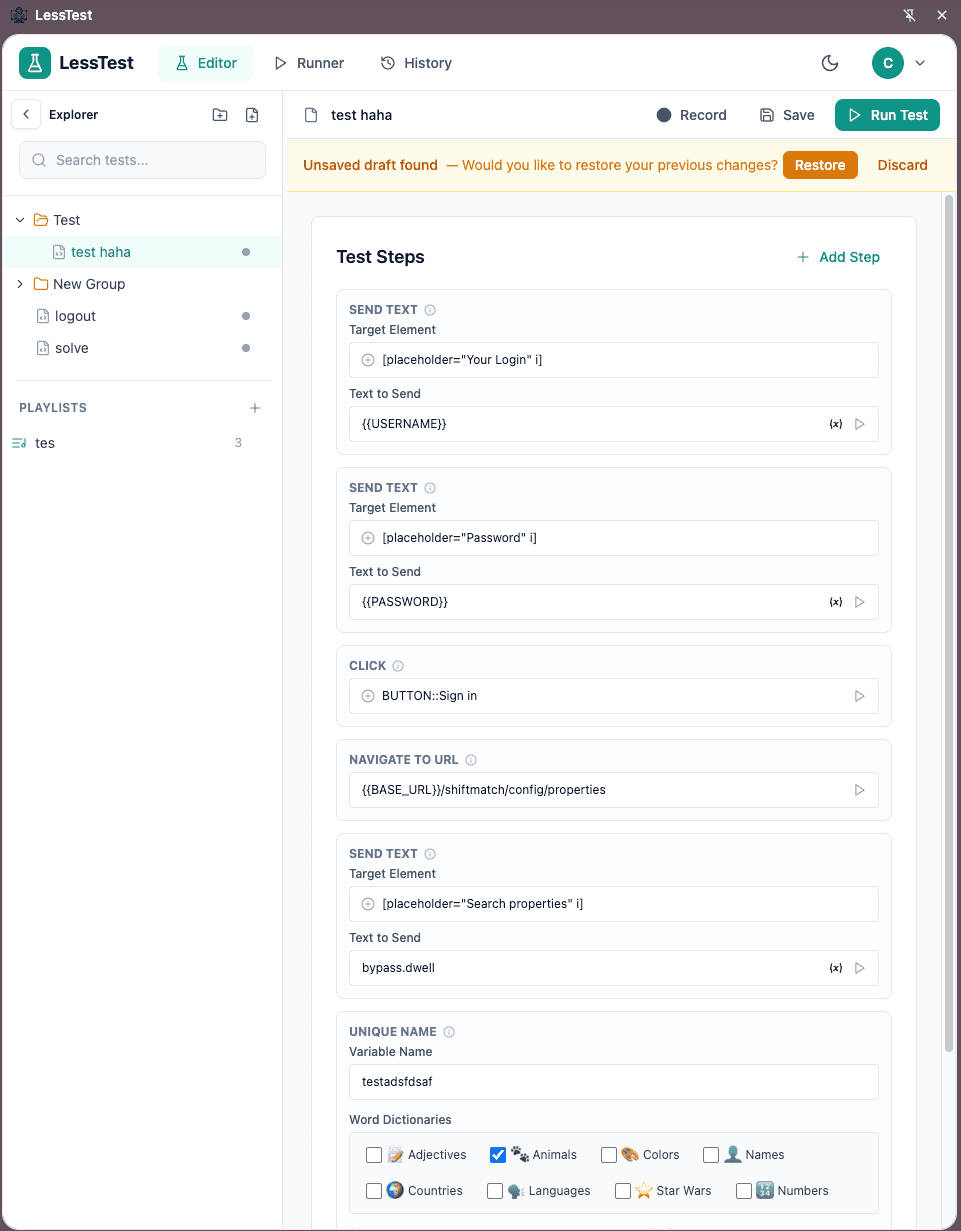
The Editor is where you create and organize your test steps. Each step is a tool that performs an action—click, type, assert, navigate, and more.
55+ Built-in Tools
Navigation, clicks, form inputs, assertions, network mocking—everything you need without writing code.
Variable System
Store and reuse values across steps. Use {{variables}} for dynamic, data-driven tests.
Point-and-Click Selectors
Click elements directly on the page. LessTest captures smart selectors automatically.
Pro tip: Use the element picker to click directly on the page. LessTest automatically generates resilient selectors that survive UI changes.
Execute with confidence
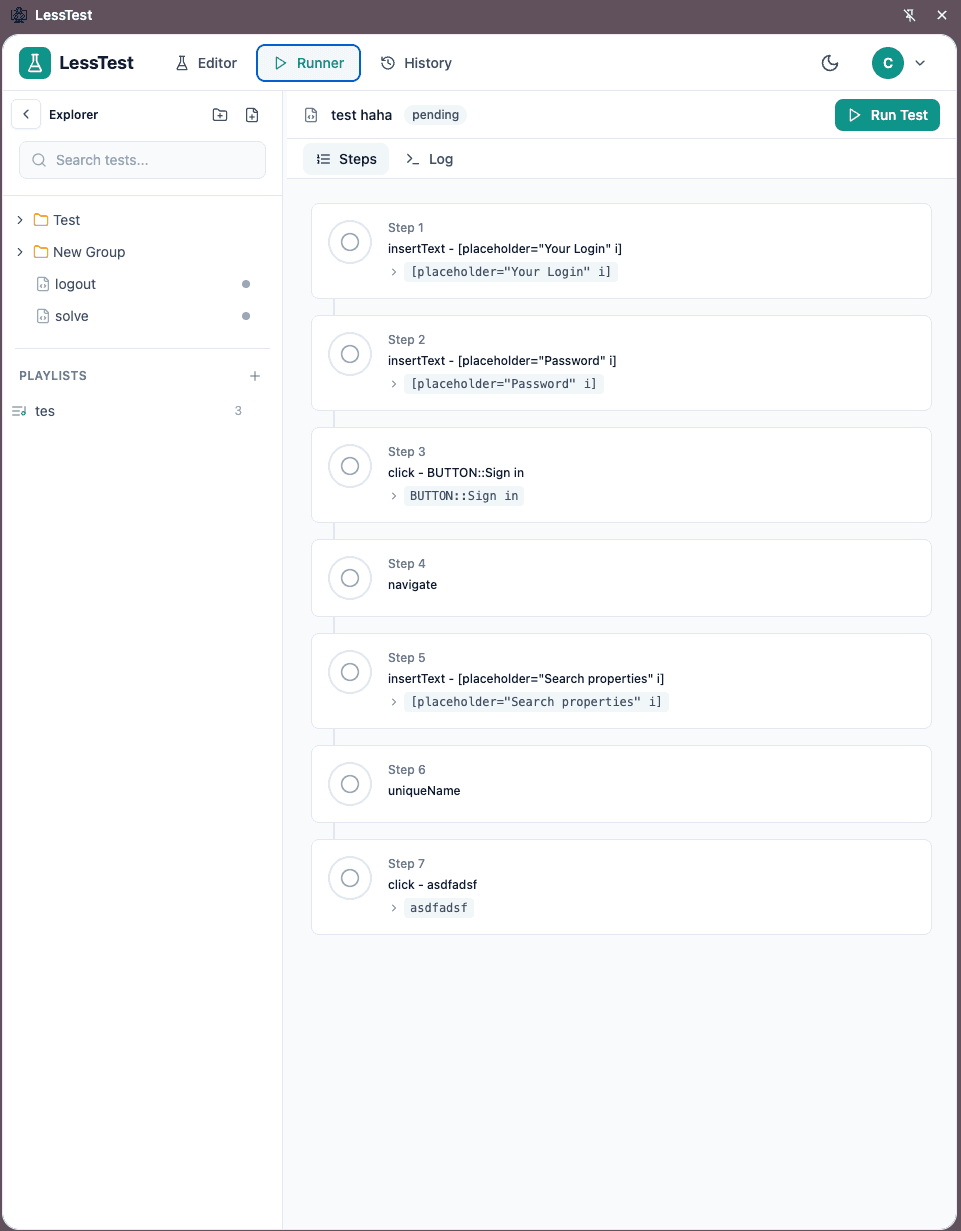
The Runner executes your tests with full visibility. Watch each step, see the results, and debug issues in real-time.
Step-by-Step Visibility
Watch each step execute in real-time. See exactly what LessTest is doing.
Pause, Edit, Resume
Stop mid-test to fix issues or adjust steps, then continue without restarting.
Detailed Logs
Full execution logs show timing, screenshots, and AI decision trails.
Debug mode: Pause execution at any step, inspect the page state, modify variables, then resume—without restarting the entire test.
Self-healing tests that understand intent
Traditional tests break when selectors change. LessTest's AI understands what you meant—not just what you clicked.
Semantic Element Matching
When you say "Click the Submit button," LessTest finds it by meaning—not just by CSS selector. If the ID changes from #btn-submit to #submit-button-v2, your test still works.
Multi-Strategy Fallbacks
LessTest tries multiple approaches before failing: exact selector, text content, ARIA labels, visual position, and AI reasoning. You see exactly which strategy succeeded.
Natural Language Steps
Use the Solve Semantic tool to describe complex actions in plain English: "Fill the registration form with test data" or "Find and click the pricing link."
Traditional Approach
// Breaks when ID or class changes
await page.click('#submit-btn-v2');
await page.fill('[data-testid="email"]', '...');

// Manual maintenance required
// No fallback strategies
// Tests fail on every refactor
LessTest Approach
✓ Works even when selectors change
✓ AI finds elements by meaning
✓ Self-healing with multiple strategies
Your testing workflow, simplified
Install
Chrome extension
Create
Visual test steps
Run
Watch live execution
Debug
Fix issues in-place
Scale
Build test suites
Ready to see it in action?
Install LessTest and create your first automated test in under 30 seconds. No credit card. No setup. Just testing.